Feedback I've Sent Cloudflare
This post was written with AI assistance (for grammar and to save time), but everything described here — every feedback item, fix, and experience — is from my own real work.
TL;DR: Over the past ~18 months I’ve sent Cloudflare a bunch of feedback on X —
- Some small dashboard/pricing fixes still waiting on a response
- a couple of open product asks (Cloudflare x Convex partnership,
- a WARP/1.1.1.1 usage dashboard),
- one proposal (a WordPress alternative, back in Oct 2024) that ended up looking a lot like what became EmDash.
- Also covers a Vercel build fix for
@opennextjs/cloudflare - a runaway image-transform bill I caught early — $17.50 in, before it got much worse (and the fix)
- an unmerged PR that still shaped a new CLI command
- a shoutout for a dev I recommended.
This post is just me collecting all of it in one place.
1. Open feedback items
A few small product requests I’ve sent Cloudflare that I think would genuinely improve the experience:
- Surface the real API error message in the dashboard UI. (tweet) — While trying to connect a custom domain (
mydomain.com) to a Worker, the dashboard just shows a generic “Failed to add domain” message. But the network tab tells the real story: thePUT /workers/domains/recordsrequest returns a409 Conflictwith a perfectly clear explanation — the hostname already has externally managed DNS records (A, CNAME, etc.) and needs to be cleared first or swapped for a different hostname. The API already knows exactly what’s wrong; the frontend just needs to show that message to the user instead of swallowing it. - A usage dashboard for WARP / 1.1.1.1. (tweet) — As a regular 1.1.1.1/WARP user, I’d love to see my own DNS query logs and usage stats, the way NextDNS and AdGuard already let you do on their dashboards.
- Clarify (and improve) the free tier/$0 plan for Images & Stream — and reconcile the two different pricing pages. (tweet) — This one’s a bit involved (and fairly specific to the Cloudflare Images/Stream team), so I’ve put the full breakdown at the end of this post.
2. The one that actually came true: a WordPress killer, before Astro and EmDash
This is the one I’m most pleased about.
Hi @Cloudflare you have D1, R2, KV and Pages. Kill @WordPress with JSPress / CFPress
A dashboard which use R2 for media and D1 for Posts/Pages and Authentication.
— Zubair Ibn Zamir (@ZubairIbnZamir) October 14, 2024
On 14 Oct 2024, I proposed that Cloudflare build a true WordPress alternative — something people only half-jokingly call a “WP killer.” At the time, this was just an idea floating out there.
Fast forward:
- Cloudflare later acquired Astro, the web framework.
- In April 2026, Cloudflare announced EmDash, an open-source CMS built on Astro and designed to run on Cloudflare’s edge network — explicitly described as a “spiritual successor to WordPress.” It tackles WordPress’s biggest weakness (plugin security) by sandboxing every plugin in its own isolated Worker, requires plugins to declare permissions upfront, ships with AI-agent and MCP support out of the box, and runs on a scale-to-zero model so it’s cheap to host.
I’m obviously not claiming credit for EmDash — Cloudflare’s team clearly had this in motion long before my tweet. But it’s satisfying to look back at an 18-month-old proposal and see the industry land almost exactly where I’d guessed it would.
3. The Cloudflare x Convex proposal
I’ve raised the idea of Cloudflare and Convex working together twice.
please do
@convex_dev ✖️ @CloudflareHoping for ~50-75% off compared to current Convex Cloud pricing 🤞@CloudflareDev @dok2001 @jamesacowling @jamwt
Make it happen 🙌PS: Convex > Durable Objects 👀
PS2: I know Cap'n Web.— Zubair Ibn Zamir (@ZubairIbnZamir) September 24, 2025
24 Sep 2025 — In my first proposal, I asked Cloudflare and Convex to make something happen together, hoping for roughly 50–75% off current Convex Cloud pricing if Convex ran on (or partnered with) Cloudflare’s infrastructure — tagging the Cloudflare Dev team along with Convex co-founders James Cowling and Jamie Turner. I added two notes: Convex is a better building block than raw Durable Objects for most app developers, and yes, I’m aware of Cap’n Web (Cloudflare’s RPC framework) — this is a different layer of the stack.
11 Jun 2026 — In my follow-up, I referenced a clip of Theo (t3.gg) making almost the same point independently, from his video Cloudflare bought Vite to destroy Vercel:
Individually, neither Void Zero nor Cloudflare worried him — Void Zero didn’t have a cloud, and Cloudflare (despite building deeply on it) didn’t understand the developer-experience problems well enough to nail them on its own. But with Cloudflare having acquired Void Zero, the combination already puts them in a strong position — and if they were to acquire Convex too, he said that would be the last piece of the puzzle, and he might just give up on his “npx lakebed” project and shut it down.
It’s interesting that two people thinking about this from different angles — one focused on pricing/infrastructure, the other on developer tooling — landed on the same conclusion: a Cloudflare-Convex combination would be a genuinely big deal for the ecosystem.
4. Fixing a Vercel build break caused by @opennextjs/cloudflare
Around the same period, I spent some time debugging a way to deploy the same Next.js project cleanly to both Vercel and Cloudflare, so I could move between the two without friction.
The issue: if next.config.js includes an unconditional call to the Cloudflare dev helper —
import('@opennextjs/cloudflare').then(m => m.initOpenNextCloudflareForDev());
— the build fails on Vercel. The root cause is a dependency chain: @opennextjs/cloudflare pulls in @ast-grep/napi, which in turn pulls in a platform-specific native binary, @ast-grep/napi-linux-x64-musl. Vercel’s build environment chokes on that binary, so the whole build breaks.
The fix is to guard the import so it only runs outside of Vercel:
if (!process.env.VERCEL) { // fire-and-forget, no await at top level import('@opennextjs/cloudflare').then(m => m.initOpenNextCloudflareForDev());}
Looking back, there’s more to the story than the tweets show. The OpenNext docs just call initOpenNextCloudflareForDev() directly, with no condition at all. The reason I’d added a guard in the first place was that I’d mistakenly set NODE_ENV=development as an environment variable in Vercel’s project settings (GUI) — so process.env.NODE_ENV === 'development' was true even during Vercel’s production builds. Combined with the unconditional initOpenNextCloudflareForDev() call from the docs, that’s what pulled in @opennextjs/cloudflare → @ast-grep/napi → @ast-grep/napi-linux-x64-musl during the Vercel build and broke it.
So there were really two separate fixes: (1) remove the stray NODE_ENV=development env var from Vercel’s dashboard — it shouldn’t be set manually there at all, Vercel manages it itself — and (2) guard the call with !process.env.VERCEL so it never runs during a Vercel build regardless of what NODE_ENV happens to be. The second fix is the more robust one, since it doesn’t depend on remembering to keep env vars clean across every project.
This setup didn’t actually last long, though — just a few days later, I moved fully to Cloudflare Workers, and since March 2026 I’ve been deploying exclusively on Cloudflare.
5. A $17.50 catch that could have been a $170 bill — and the feedback that came out of it
What happened: My site serves ~150 photos from R2, each at a few sizes. The real problem wasn’t the number of unique images — it was where the transformation ran. With Next.js’s default image optimisation, the /_next/image endpoint executes inside the Cloudflare Worker, and Worker-generated responses don’t pass through Cloudflare’s CDN cache layer (Cache Rules don’t apply to them). So cf-cache-status was absent entirely and every request re-ran the transform — the billable count scaled with traffic, not with my image library. Within ~2 days a traffic spike had pushed me past 30,000 transformations (peaking near 36k), which had already cost ~$17.50 on top of the 5,000 free per month. I caught it early; left unnoticed for the full billing period, the same rate would have run to something closer to ~$170. Two things compounded it: too many variants (16 sizes × 2 formats per image, far more distinct combinations than I needed), and minimumCacheTTL in next.config being silently ignored by the Cloudflare Images binding.
The fix: two changes. First, cut the variants — deviceSizes: [640, 1080, 1920], imageSizes: [64, 128, 256], formats: ["image/webp"] — shrinking the number of distinct image+size+format combinations my site can ever produce down to ~1,500. (The runaway 36k figure wasn’t distinct variants — it was billed transformations, inflated because every visit was re-transforming uncached.) Second, and the structural fix: move transformation out of the Worker and onto the CDN by switching to a custom image loader (src/lib/image-loader.ts) that uses Cloudflare Image Resizing via cdn-cgi/image/... URLs. These are ordinary CDN requests, so Cloudflare caches each result at the edge (cf-cache-status: HIT) — repeat views are served from cache instead of re-transforming and re-billing. I also set a Cache Rule on the image path (1-year edge TTL, since origin Cache-Control defaults to only a few hours; 7-day browser TTL). Local public/ images are returned as-is, no transformation.
The feedback: Off the back of this, I tweeted Cloudflare asking them to show the project/zone name directly in the account-level Transformations analytics. Right now, the account-wide Transformations analytics view gives a clean daily breakdown — currently around 1,650 unique transformations across all the images on my sites — but it doesn’t break those numbers down by individual project or zone.
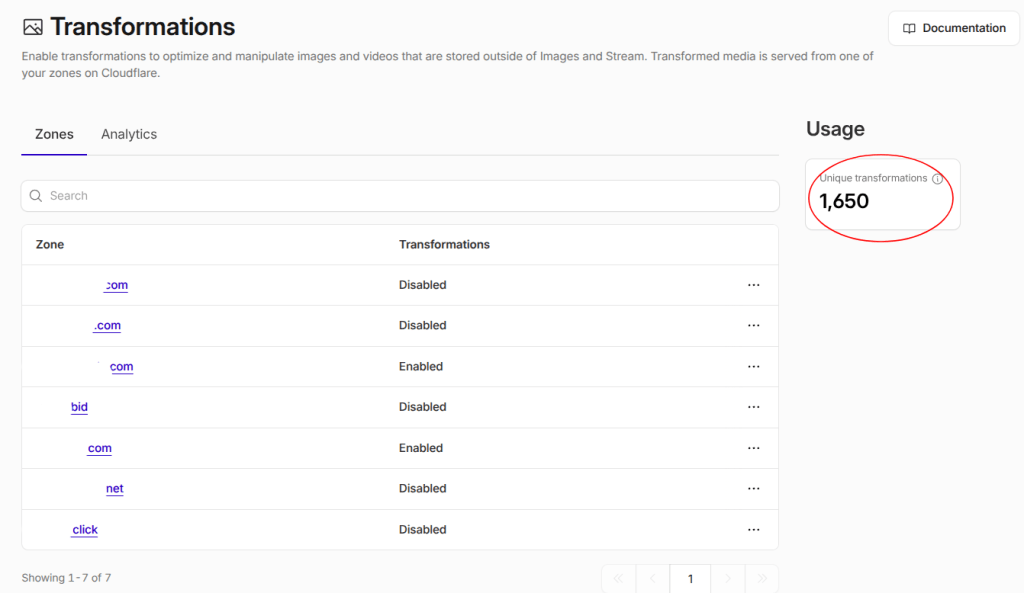
— but no indication of which domain is generating them. You can drill into a specific zone’s own Images > Analytics tab ,
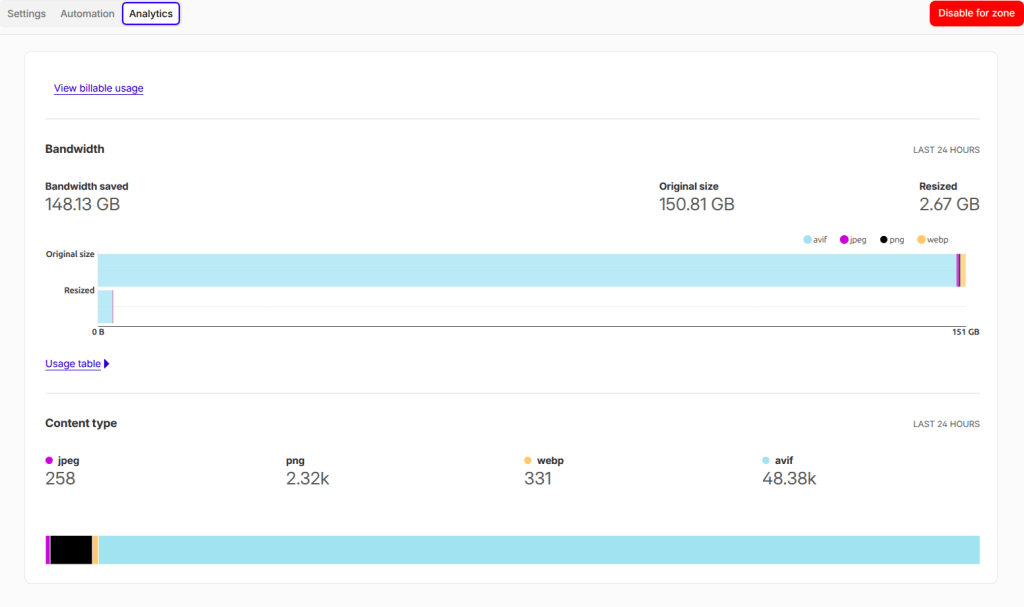
for mydomain.com and get useful per-zone stats like bandwidth saved and content-type breakdowns, but it doesn’t show the same daily “unique transformations” chart that the account-level view has.
(Note: the 2 images above are screenshots from today, not from when the tweet was originally posted.)
To see the account-wide view, log into the Cloudflare dashboard and visit:
https://dash.cloudflare.com/[your-account-id]/images/transformations/analyticsTo see a specific zone’s view, visit:
https://dash.cloudflare.com/[your-account-id]/images/transformations/zone/[your-zone-id]/analytics(replace
[your-account-id]and[your-zone-id]with your own IDs, visible in your dashboard’s URL or account/zone settings)
So if you run multiple zones, the only way to find out which one is racking up transforms is to check each one individually — manageable with one project, painful with several. If the account-level chart in image 1 could be broken down by project, I (or anyone else) could spot a misconfigured image loader within a day or two, instead of discovering it on the next invoice.
I’m fairly confident the fix worked, though I haven’t 100% confirmed it yet — keeping an eye on the next billing cycle to be sure.
6. An unmerged PR that still left a mark
Not all contributions need to get merged to make a difference. I opened PR #1004 on opennextjs/opennextjs-cloudflare, adding a new migrate CLI command that automated the existing 10+ step manual process for migrating an existing Next.js app to OpenNext.js for Cloudflare — generating/updating wrangler.jsonc, open-next.config.ts, .dev.vars, package scripts, detecting Edge runtime usage, and offering an interactive package-manager picker (npm/pnpm/yarn/bun/deno).
A maintainer reviewed it, said the idea was good but the implementation needed work, and I offered to let the team adjust or rewrite it however they saw fit. A couple of months later, another maintainer, Dario Piotrowicz, took my changes and expanded on them in a new PR, eventually closing mine in favor of that one — while explicitly crediting the contribution and thanking me for it. The command itself ended up being renamed from migrate to init along the way, but the underlying idea — an automated setup command instead of a 10+ step manual guide — is the one I originally proposed.
It’s a good reminder that a PR doesn’t have to land to be useful — sometimes the idea is the contribution, and someone with more context picks it up and finishes it properly.
7. Recommending good people
Separately, I also tried to point Cloudflare toward a developer I thought would be a strong hire. Always happy to do this when I come across people who are genuinely good at what they do.
8. Two more UI fixes — this time with a screen recording
Most recently, I posted a screen recording walking through two more UI-related issues in the Cloudflare dashboard, showing exactly where things break down rather than just describing them in text.
Putting that recording together is actually what prompted this whole post — after sending Cloudflare yet another piece of feedback, it occurred to me that I’d built up a fairly long list of these over time, scattered across individual tweets, and it made sense to finally collect them all in one place.
Takeaway: Most of this list is just a running log of small product feedback — some of it acted on, most of it not (yet). But the EmDash/Astro thread is a nice reminder that paying attention to where the edge-computing and CMS worlds are heading can occasionally put you a year and a half ahead of an announcement.
Appendix: the Images & Stream pricing confusion, in full
This is the detail behind the third item in section 1 — it’s a bit long and fairly specific to the Cloudflare Images/Stream team, so I’ve kept it out of the main flow.
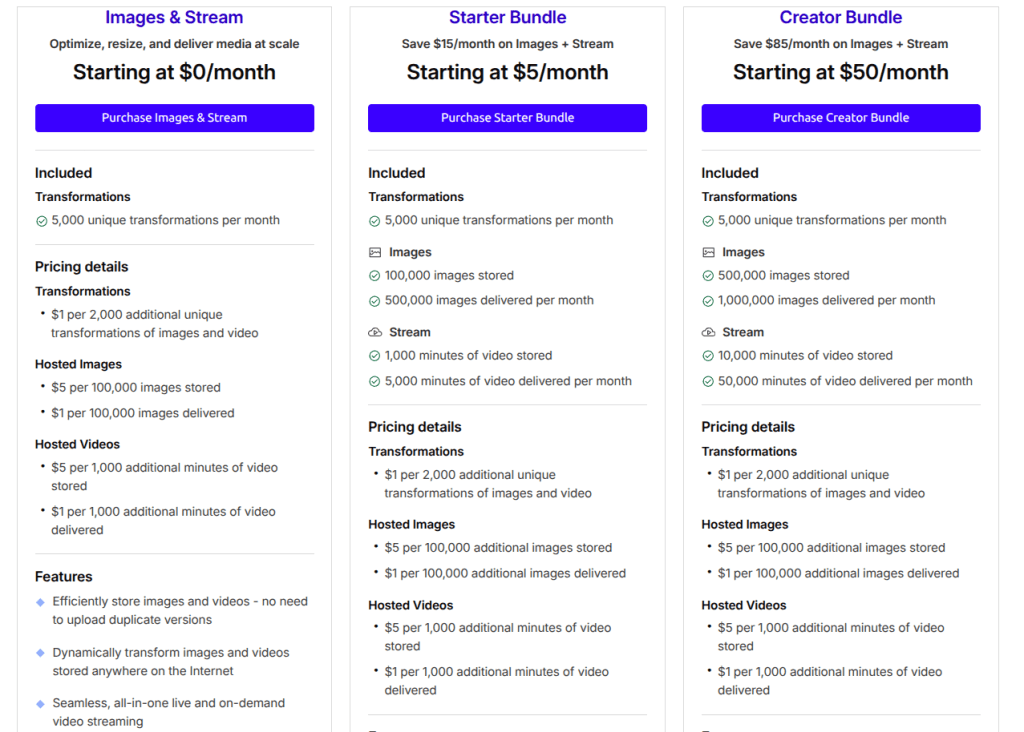
The free video allowance is unclear. The free ($0/month) Images & Stream plan clearly includes 5,000 unique transformations per month for images. What’s confusing is video: the same $0 plan’s pricing details list a price for additional “Hosted Videos” usage ($5 per 1,000 extra minutes stored, $1 per 1,000 extra minutes delivered) but never state a base free allowance — compare that to the $5/month Starter Bundle, which explicitly includes 1,000 minutes stored and 5,000 minutes delivered per month. So is the free video allowance 0 minutes, or just undocumented?
Small usage amounts raise a billing question too. If it turns out some small free video allowance is possible — say a developer ends up storing or delivering just 10 or 100 minutes of video — how would that even be billed? Is there a minimum billing increment (e.g. you get charged for a full 1,000 minutes regardless), or do partial amounts like 10 or 100 minutes get billed proportionally? None of this is spelled out anywhere. The Cloudflare Docs Stream pricing page doesn’t help resolve this either.
The “Images” pricing is confusing because it shows up in two places. It’s not that the Cloudflare Docs Images pricing page and the Images & Stream bundle page actually contradict each other — both are accurate on their own terms. The confusing part is that “Images” appears as its own standalone product (with storage-capacity tiers like 100,000 images for $5/month) and as part of the Images & Stream bundle. It’s not obvious how these relate for an account that might end up touching both, or which numbers actually apply to you.
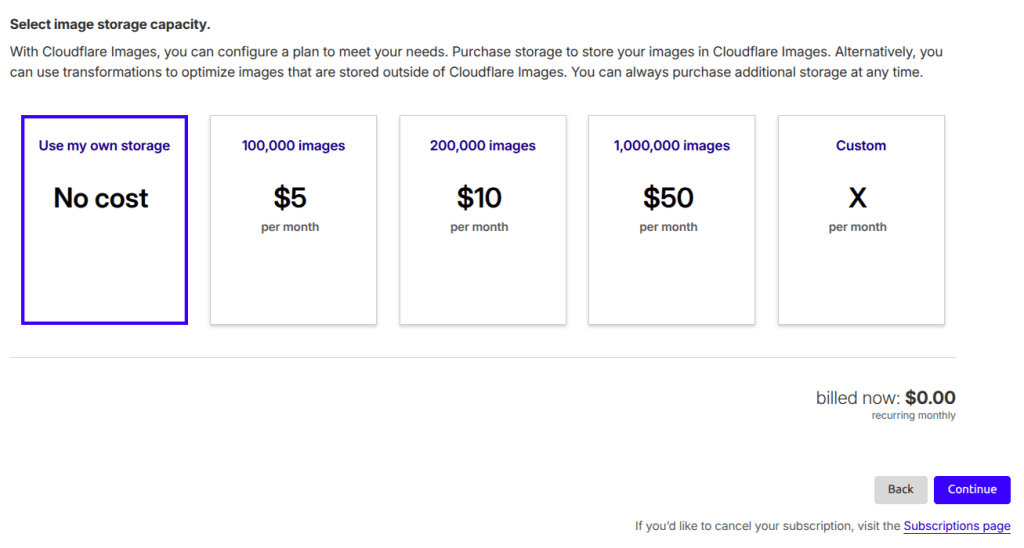
If Cloudflare Stream currently includes zero free video minutes, then even a small, clearly-stated free video allowance — say ~60 minutes stored/delivered — plus a single, consistent pricing explanation across these pages would let developers actually understand and test Images & Stream before committing to a paid plan.
For what it’s worth, my own setup now uses R2 for image storage, with caching set to 1 year at the edge and 1 month in the browser for each transformation — so I only end up hitting around 1,600+ of the 5,000 free monthly transformations. It works well once you’ve figured it out, but the pricing confusion above is exactly the kind of thing that trips up newcomers before they get there.